> ## Documentation Index
> Fetch the complete documentation index at: https://docs.nfig.io/llms.txt
> Use this file to discover all available pages before exploring further.
# Integrations
> Nfig uses integrations to connect with your favorite tools
## Authentication
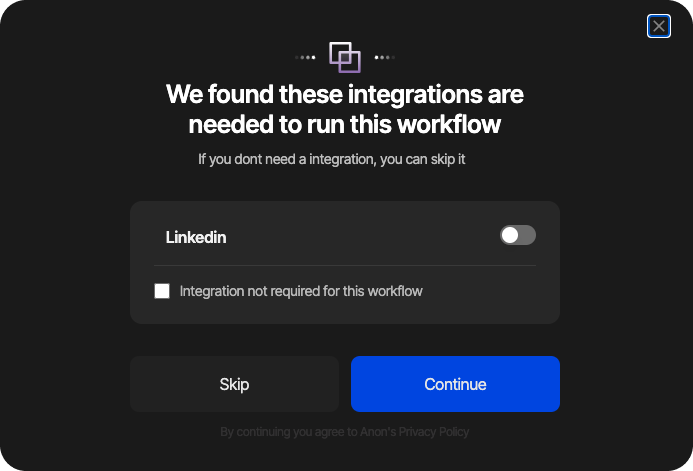
Nfig automatically detects login pages and asks you whether to use an integration to stay logged in, or to handle the login manually.
**Note**: This popup will only appear when a login page is detected.
Click on the toggle to initiate the login process.
 ### Login process
A browser plugin is required if you want the agents to stay signed in to the websites in your workflow. You'll be automatically prompted to install it once Nfig detects a login page, or you can install it from [here](https://chromewebstore.google.com/detail/nfig/okbfobojpclgmdllihgckbgiofaidgmf)
### Login process
A browser plugin is required if you want the agents to stay signed in to the websites in your workflow. You'll be automatically prompted to install it once Nfig detects a login page, or you can install it from [here](https://chromewebstore.google.com/detail/nfig/okbfobojpclgmdllihgckbgiofaidgmf)
 **Note**: If you don't install the browser plugin, you'll have to manually sign in to the websites in your workflow.
Nfig supports authentication via Linkedin, Amazon, Github etc. You can view the list and enable/disable them in [settings](https://app.nfig.ai/settings).
**Note**: Running multiple authenticated automations on target websites will increase the risk of your accounts being flagged as bots.
**Note**: If you don't install the browser plugin, you'll have to manually sign in to the websites in your workflow.
Nfig supports authentication via Linkedin, Amazon, Github etc. You can view the list and enable/disable them in [settings](https://app.nfig.ai/settings).
**Note**: Running multiple authenticated automations on target websites will increase the risk of your accounts being flagged as bots.